WPX Hosting Review 2026: Is It Worth It for Beginner Bloggers?

A complete WPX Hosting review for bloggers. See its pricing, features, pros and cons, and find out if WPX is worth the cost for your WordPress site.
Start Building Your Online Income
Ready to Start Earning Online? Our Beginner’s Starter Kits give you practical guidance on specific ways to earn online, helping you understand how they work, what you need to get started, and the steps to take along the way. Each kit is focused on a specific method, so you can spend less time searching for scattered information and more time putting what you learn into practice.
I have heard plenty of complaints from bloggers and website owners about the web hosting they chose. Slow websites, poor support, unexpected problems, and the hassle of moving everything to another host can turn hosting into a bigger headache than it needs to be.
Choosing the right hosting provider is one of the important decisions you’ll make when starting or growing a WordPress blog.
Get it wrong, and you can end up dealing with slow load times, unreliable support, and the painful process of migrating your site later. Get it right, and your website can run smoothly while you focus more of your time on creating content and growing your income.
WPX Hosting is a managed WordPress hosting provider, which puts it in a different category from basic shared hosting. It costs more than many entry-level hosts, but you get features and support designed for website owners who care about performance and reliability.
In this WPX hosting review, I’ll look at what WPX Hosting offers, what it costs, who it makes sense for, and whether it is worth considering if you’re starting or growing a WordPress blog in 2026.
Quick Verdict: WPX Hosting is a strong managed WordPress host with fast support, a custom CDN, and a solid feature set that genuinely removes the technical burden for bloggers who want their hosting to just work. It is worth paying for if you are running an active blog with growing traffic and cannot afford technical downtime. It is not the right starting point if you are on a tight budget and building your first blog from scratch.
TL;DR
- WPX is managed WordPress hosting focused on performance, security, backups, and customer support.
- The Starter plan costs $17.99 per month for one website, while the Business plan costs $29.99 per month for up to five websites.
- WPX includes useful managed features such as daily backups, malware removal, free site migrations, and its custom CDN.
- WPX costs more than budget hosting, so the extra features and support need to justify the higher monthly expense for your website.
- If you are starting with a limited budget, Hostinger can be a lower-cost option while you build your site and audience.
What Is WPX Hosting?
WPX, which stands for Web Powered eXcellence, is a managed WordPress hosting provider that was founded in 2013.
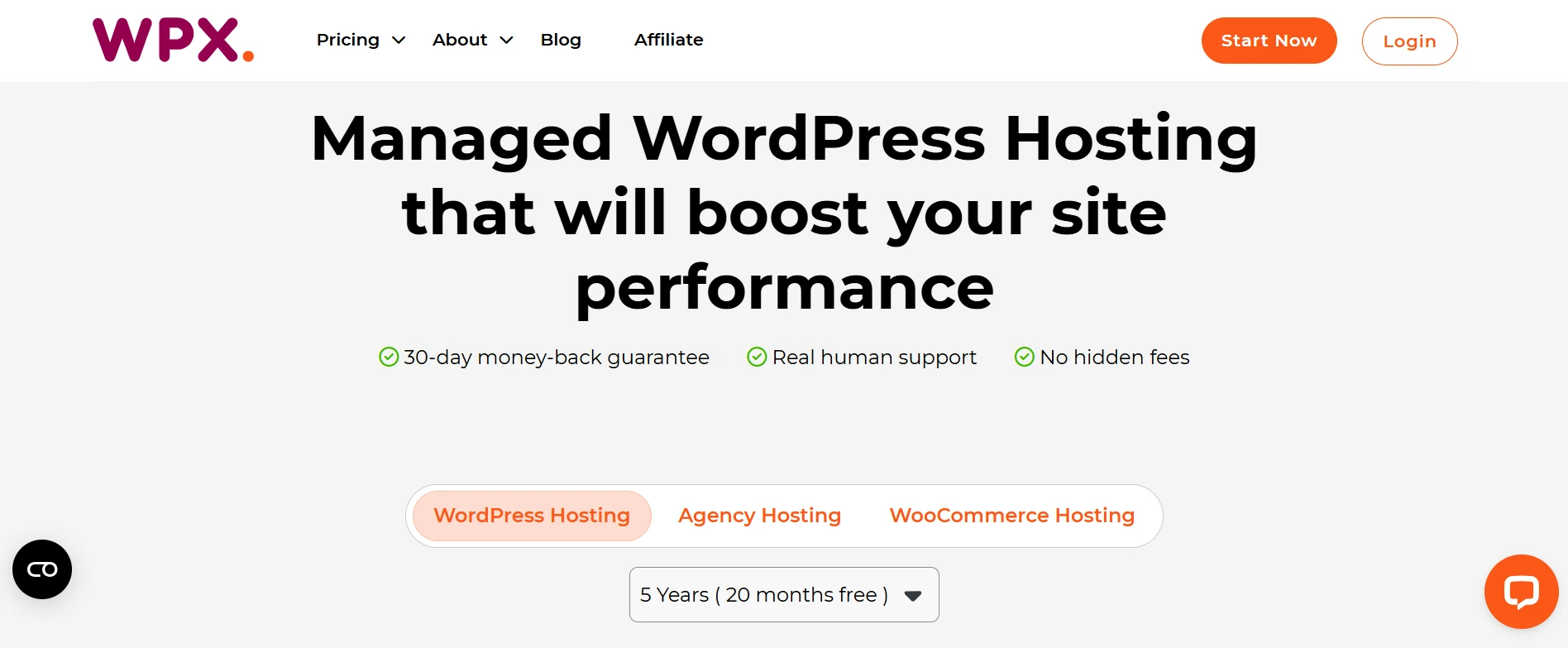
The main difference with managed hosting is that you do not have to handle as much of the technical work yourself. Things like server setup, security updates, performance, malware scanning, and backups are handled as part of the hosting service.
That is different from traditional shared hosting, where you mainly get server space and a control panel and are expected to take care of more of the technical side yourself.
WPX has built its reputation around website speed and customer support. Its custom global CDN is designed to help websites load quickly for visitors in different locations, while its support team is known for responding quickly when customers need help.
For bloggers who depend on their websites for traffic and income, having a fast and reliable site can be important. A hosting problem that keeps your site down or slows it down can affect both your visitors and your business.
Recommended Reading: Best Blogging Platforms for Beginners: Which One Should You Actually Use?
WPX Hosting Plans and Pricing
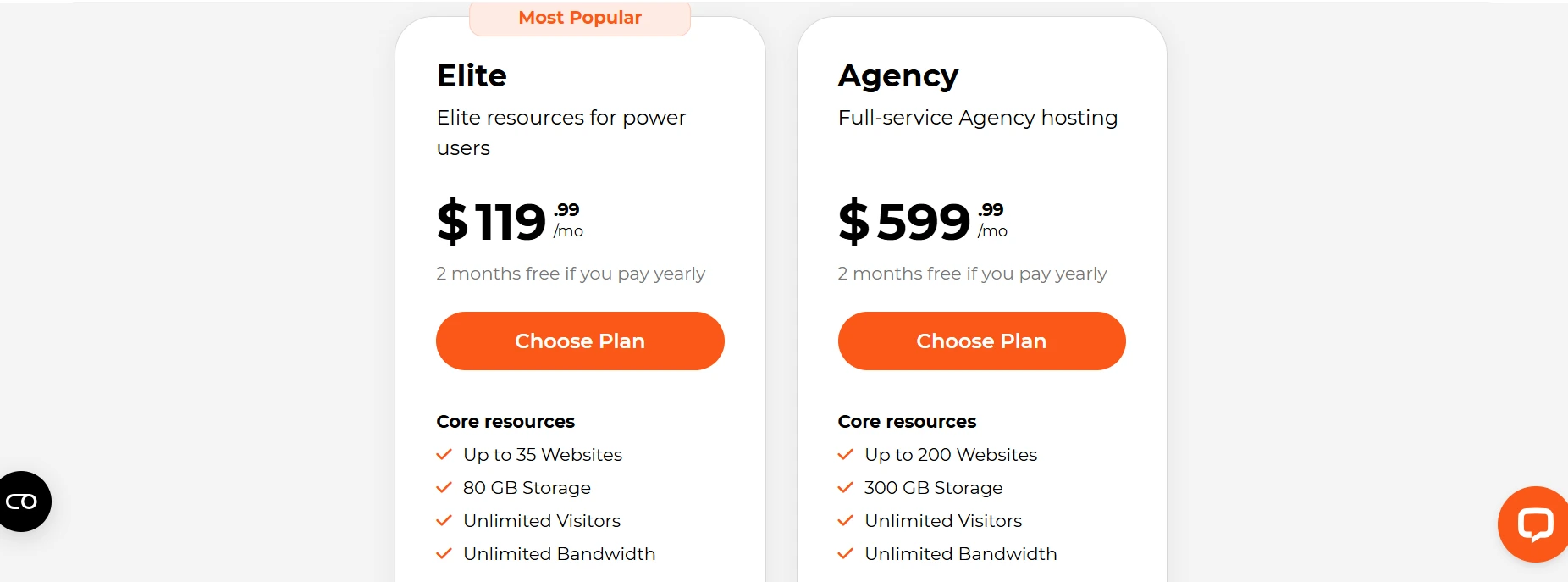
WPX currently has five managed WordPress hosting plans, starting with Starter and going up to Agency. The right plan depends mainly on how many websites you need to host and how much room you need for growth.
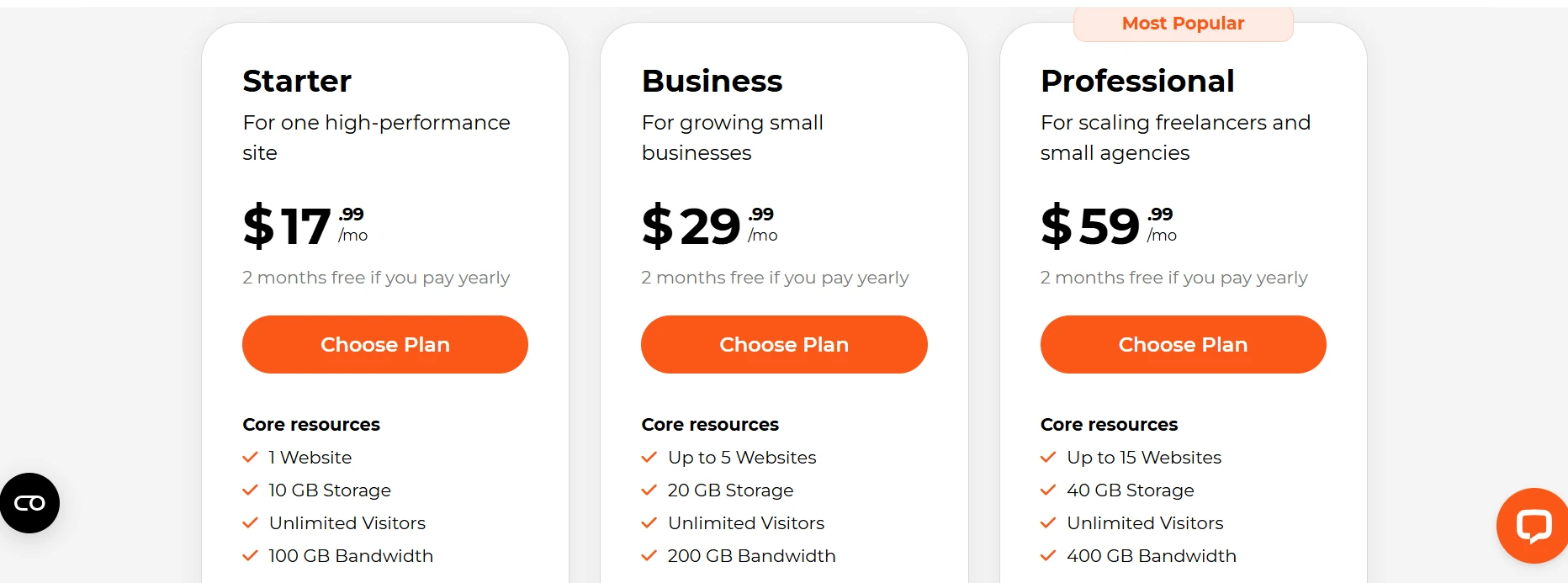
1. Starter Plan: $17.99 per month
The Starter plan is designed for one WordPress website. It includes 10 GB of storage, 100 GB of bandwidth, and unlimited visitors. It is the lowest-priced WPX plan and may be enough if you are running a single blog and want managed hosting without paying for resources you do not need.
2. Business Plan: $29.99 per month
The Business plan supports up to five websites and includes 20 GB of storage and 200 GB of bandwidth. It also adds business email, webmail, unlimited mailboxes, and email migration. This is a more practical option if you plan to run several websites or expect your blog portfolio to grow.
3. Professional Plan: $59.99 per month
The Professional plan supports up to 15 websites, with 40 GB of storage and 400 GB of bandwidth. It also provides more server resources than the Business plan. This makes it more suitable for freelancers, agencies, or website owners managing several growing sites.
4. Elite Plan: $119.99 per month
The Elite plan supports up to 35 websites, with 80 GB of storage and unlimited bandwidth. It is aimed at users managing larger website portfolios and sites that need more resources.
5. Agency Plan: $599.99 per month
The Agency plan is WPX’s highest WordPress hosting tier. It supports up to 200 websites and provides 300 GB of storage and unlimited bandwidth. This is designed for agencies and businesses managing a large number of websites rather than someone running a single blog.
WPX also offers annual billing, with two months free on its standard annual pricing. For example, the Business plan works out to $249.99 per year, while Professional is $499.00 per year.
Another advantage I find interesting is that WPX offers discounts on some monthly plans, so the price you see when signing up may be lower than the standard rate for the first month. I recommend always checking the official WPX pricing page before purchasing because promotions and pricing can change.
All WPX WordPress hosting plans include a 30-day money-back guarantee, giving you time to test the service before committing long-term.
Check WPX Hosting’s Current Plans and Pricing.
WPX Hosting Features: What Do You Get?
WPX includes a good range of features with its hosting plans. However, the exact features and resources vary between plans, so it is worth checking the plan details before you sign up.
Here are some of the features I think are worth knowing about.
1. Custom Global CDN
WPX has its own content delivery network, called XDN, with more than 40 locations around the world. A CDN helps deliver your website content from locations closer to your visitors, which can improve loading times for people visiting from different parts of the world. WPX includes its XDN with all WordPress hosting plans.
2. Free Site Migration

If you already have a WordPress website with another host, WPX will migrate it for free. The migration is handled by its team, so you do not have to deal with moving your files and database yourself. WPX says standard migrations are completed within 24 hours, although there are some exceptions, such as migrations that also involve changing the domain name.
3. Daily Backups
WPX automatically backs up your website every day, with backups retained for 28 days. This gives you a way to restore an earlier version of your site if something goes wrong after an update or another change.
4. Free SSL Certificates

SSL certificates are included with WPX hosting, so you can run your website over HTTPS without paying separately for an SSL certificate.
5. Free Malware Removal

WPX includes malware scanning and removal with its hosting plans. If your website becomes infected, its team can help clean it up without charging a separate malware removal fee.
6. Fixed For You Guarantee
The Fixed For You Guarantee is one of the more interesting features WPX offers. If your site goes offline because of an issue covered by the guarantee, WPX says its team will work to fix the problem for you at no extra charge. There are limits to what the guarantee covers, particularly problems caused by third-party plugins, themes, or poorly coded software, so it is worth understanding those limits before relying on it.
7. 24/7 Support
This is one of the features I find most useful about WPX. The company provides 24/7 live chat support, and WPX currently advertises an average response time of around 30 seconds. It also says that about 90% of issues are resolved through chat in real time.

For someone running a website as a business, quick access to technical help can be valuable. If something goes wrong, getting help quickly can save you time and reduce the amount of time your site spends experiencing problems.
Is WPX Hosting Good for Beginner Bloggers?
The answer depends on your situation and what you want from your hosting.
If you are starting your first blog with a small budget and very little traffic, WPX may be more hosting than you need at this stage. Its standard plans start at $17.99 per month, which is considerably more than many entry-level hosting options. At the beginning, you may prefer to keep those extra monthly costs low while you focus on creating content and growing your audience.
On the other hand, if you have the budget and want managed WordPress hosting from the beginning, WPX can be a good fit. You get features such as managed migrations, daily backups, malware removal, a custom CDN, and 24/7 support. Starting with WPX also means you are less likely to need to move your site later as it grows.
For me, the main question is not simply whether WPX is good for beginners. It is whether the extra cost makes sense for your particular stage of blogging.
If you are working with a tight budget and your site is still receiving very little traffic, a reliable lower-cost host may be enough. If you can comfortably afford WPX and value its managed features and support, there is nothing wrong with starting there from day one.
As your traffic and income grow, the value of faster performance, stronger support, and managed hosting can become easier to justify.
WPX Hosting Pros and Cons
Pros
WPX support is one of its strongest points. The company has an average live chat response time of around 30 seconds, which can make dealing with a technical problem much less stressful.
The custom CDN is included with the hosting plans, so you do not need to set up a separate CDN service. This can be useful for bloggers who want their content to load quickly for visitors in different locations.
Daily backups and free malware removal are also included. That gives you some extra protection without having to pay separately for backup or malware removal services.
Free website migration is another useful benefit. If you already have a WordPress site with another host, WPX can handle the migration for you.
WPX also has fairly straightforward pricing compared with hosts that rely heavily on low introductory rates and much higher renewal prices. It is still a premium hosting service, but you have a clearer idea of what you will be paying.
Cons
The biggest drawback is the price. The Starter plan begins at $17.99 per month, while the Business plan costs $29.99 per month on standard monthly billing. That is considerably more than many budget hosting plans, which can be a significant expense for a new blog that is not earning money yet.
The Starter plan only supports one website, so bloggers planning to manage several sites may need to move up to the Business plan at $29.99 per month. This makes WPX more expensive if you want to host multiple websites.
WPX does not offer phone support. Support is handled through live chat, which is convenient for many users, but people who prefer speaking directly with a support agent may find this limiting.
WPX can also be more than a beginner needs. If your main priority is keeping your initial blogging costs as low as possible, some of its managed hosting features may not justify the extra monthly expense at the very beginning.
See if WPX Hosting is Right for Your Website.
WPX Hosting vs Budget Hosting: Who Should Pay More?
The honest comparison between WPX and budget hosting like Hostinger comes down to what your website needs right now.
If you are starting a new blog with little traffic and no income yet, spending more on hosting may not make sense. A lower-cost host can give you enough resources to build your site, publish content, and grow your traffic without adding a large monthly expense.
For example, Hostinger currently offers plans starting at $2.99 per month on a 48-month plan, with WordPress tools, backups, a CDN, SSL, and 24/7 support included. The actual features depend on the plan you choose, and the promotional price is tied to a longer billing period.
WPX is in a different price range. Its Starter plan currently costs $17.99 per month for one website, while its Business plan costs $29.99 per month. In return, you get managed WordPress hosting with features such as daily backups, malware removal, free migrations, its custom CDN, and 24/7 support.
The difference becomes easier to consider once your website starts earning money.
If your blog is bringing in several hundred dollars each month, hosting becomes a business expense rather than simply another startup cost. Faster performance, managed services, backups, security help, and quick access to support may become more valuable as your site grows.
That does not mean WPX will automatically make a profitable blog more profitable. Hosting is only one part of website performance, and a slow site can have many possible causes.
For a new blogger working with a tight budget, keeping hosting costs low can leave more money available for other parts of building the site. If your website is already generating income and you value having more of the technical work handled for you, paying more for managed hosting may make more sense.
Both options can work. The important thing is to choose a hosting plan that matches the stage your website is actually at, rather than paying for resources and services you do not currently need.
Recommended Reading: How Bloggers Make Money Online (And What the Real Income Numbers Actually Look Like).
Who Should Choose WPX Hosting?
WPX may make sense for you if several of these points apply.
Your blog is already earning money, and you are comfortable paying more for managed hosting. You value having quick access to support when something goes wrong. You are managing multiple WordPress websites and need a hosting plan that can handle them. You are also moving an existing site from another host and would rather have the migration handled for you.
WPX can also be worth considering if you simply prefer having more of the technical side managed for you. Features such as daily backups, malware removal, free migrations, and WPX’s custom CDN can reduce the amount of hosting work you need to handle yourself.
On the other hand, WPX may not make much sense if you are building your first blog with a very limited budget. If your site has very little traffic and is not earning anything yet, a lower-cost host may provide everything you need while you focus on publishing content and growing your audience.
The same applies if you are still testing blogging to see if it can become an income source. In that situation, keeping your monthly costs low can be more important than paying for premium managed hosting from the beginning.
For me, WPX becomes easier to justify as a site grows and the convenience of managed hosting becomes more valuable. For a brand new blog, starting with a reliable lower-cost host can be a perfectly reasonable approach.
Recommended Reading: How to Start a Blog and Make Money for Beginners.
Thinking about starting an affiliate website? I can help you build and set up your WordPress site so you can focus on creating content and growing your affiliate income. Learn more about my affiliate website setup service.
Is WPX Hosting Worth It in 2026?
Yes. WPX is a premium hosting service, and its price reflects that.
What you get is more than basic server space. WPX handles much of the technical side of WordPress hosting and adds services such as backups, malware removal, migrations, CDN delivery, and 24/7 support.
The real question is how much those features are worth to you. Some website owners will gladly pay more for the convenience and support. Others would rather keep their hosting costs low and handle more of the setup themselves.
I think that is the fairest way to look at WPX in 2026. It is not a hosting service you need simply because you are running a WordPress blog. It is a premium option for people who place a higher value on managed hosting, support, and convenience.
For a growing website, those benefits can become increasingly useful. For someone who wants to keep things simple and control costs, there are other hosting options worth considering.
WPX is therefore less about finding the cheapest place to host a website and more about deciding how much you want to pay for the way your hosting is managed.
Key Takeaways
- WPX is managed WordPress hosting with features such as a custom CDN, daily backups, malware removal, and 24/7 support.
- The Starter plan costs $17.99 per month, while the Business plan costs $29.99 per month on standard monthly billing. Annual billing is available with two months free on standard pricing.
- WPX costs considerably more than budget hosting, so the extra features need to be worth the additional expense for your website.
- Free migrations, daily backups, and malware removal can reduce the amount of technical work you need to handle yourself.
- WPX is worth considering if you value managed hosting and support, while a lower-cost host may be enough if keeping your initial expenses low is your priority.
Conclusion
WPX Hosting offers a strong managed WordPress hosting package, but the higher price means it will not make sense for every blogger.
What stands out to me is the combination of hosting performance, hands-on support, backups, security features, and free migration. Having these things handled for you can make running a WordPress site easier, especially when the website has become an important part of your online business.
The main thing to consider is the cost. At $17.99 per month for the Starter plan and $29.99 for Business, WPX is a significant step up from budget hosting.
If you value the extra support and managed features, that higher cost may be reasonable. If keeping your monthly expenses low is more important, a reliable budget host can still do the job.
For me, WPX makes the most sense when you are ready to pay for convenience, support, and managed hosting rather than simply looking for the cheapest place to run a WordPress website.
Frequently Asked Questions: WPX Hosting Review
Is WPX Hosting good for beginners?
WPX Hosting can be good for beginners who want managed WordPress hosting and quick access to support. However, its higher price may not suit someone starting with a very small budget. A cheaper host can be enough for a new, low-traffic blog.
How much does WPX Hosting cost in 2026?
WPX Hosting starts at $17.99 per month for the Starter plan. The Business plan costs $29.99 per month and supports up to five websites. WPX also offers annual billing, with two months free on its standard annual pricing.
Is WPX Hosting worth the money?
WPX Hosting can be worth the money if you value managed hosting, support, backups, security features, and free website migration. The higher price is harder to justify when you are running a new blog with very little traffic or income.
Is WPX Hosting faster than budget hosting?
WPX is designed as premium managed WordPress hosting with performance-focused features, including its custom CDN. However, website speed depends on several factors, including your theme, plugins, images, caching, and site configuration, so hosting alone does not determine performance.
Can I move my WordPress website to WPX Hosting?
Yes. WPX offers free WordPress website migrations, with its team handling the transfer for you. This can be useful if you are moving from another hosting provider and do not want to manage the migration process yourself.