How to Create Digital Products to Sell Online (Even if You’re Starting From Scratch)

Wondering how to create digital products to sell online but don’t know where to start? This beginner-friendly guide walks you through what to make, how to make it for free, and where to sell your first product.

The first time I understood why digital products matter, I was looking at someone’s income report.
Not the number itself. The structure of it. They had written a guide three months earlier, spent a weekend on it, and that guide was still selling every week without them doing anything additional to make it happen. The work was done once. The income kept coming.
That is not how most income works. Most income stops the moment you stop working. A digital product doesn’t.
Learning how to create digital products to sell is one of the most practical steps a beginner can take toward building income that doesn’t require your constant presence. And the barrier to starting is lower than most people realise. You don’t need design skills, expensive software, or thousands of followers. You need knowledge, a clear format, and the right platform to sell from.
This guide walks you through all of it.
Quick Answer
To create a digital product to sell, choose a topic you know well, pick a beginner-friendly format like an ebook, a template, or a simple guide, use free tools like Google Docs and Canva to create it, and list it on a free platform like Gumroad, Payhip or Systeme.io. Your first digital product can be live and ready to sell within a week of deciding to create it.
TL;DR
- Digital products are created once and sold repeatedly, making them one of the most practical passive income streams for beginners.
- The best first product is the simplest one you can finish this week. An ebook, a template, or a one-page guide is more valuable than a course you spend six months building.
- You don’t need design skills, expensive tools, or an existing audience to create and sell your first digital product.
- Platforms like Gumroad, Payhip, and Systeme.io let you start selling for free with no monthly fees.
Recommended Reading: 8 Easy Passive Income Ideas for Beginners With No Money
How to Create Digital Products to Sell: A Quick Summary
| Step | What to Do | Tools to Use | Time Needed | Why It Matters |
|---|---|---|---|---|
| 1. Choose your topic | Pick something you know well that solves a specific problem for someone else | Your knowledge, a notebook | 1–2 hours | A specific, useful product sells better than a broad, vague one |
| 2. Pick your format | Choose the simplest format you can finish this week (ebook, template, printable, mini-course) | Google Docs, Canva | 30 minutes | The fastest format to finish is usually the right first choice |
| 3. Create the product | Write the content, design the layout, and export as PDF or shareable template | Google Docs, Canva | 1–3 weekends | A finished product is worth more than a perfect one you never launch |
| 4. Set up a sales page | Create a product page with a description, price, and payment method | Payhip (free) or Systeme.io (free) | 1 hour | Your product is live and ready for buyers |
| 5. Price it fairly | Research similar products and price based on value, not effort | Market research | 30 minutes | Correct pricing signals value and attracts serious buyers |
| 6. Get your first sale | Share directly with your network, post in communities, and build an email list | Beehiiv, Facebook groups, Pinterest | Ongoing | The first sale proves the model works and builds confidence |
Digital Product Formats at a Glance
| Format | Best For | Time to Create | Average Price | Tools Needed |
|---|---|---|---|---|
| Ebook / PDF guide | Writing, teaching, step-by-step instructions | 1–3 weekends | $7–$27 | Google Docs, Canva |
| Canva templates | Design, social media, printables, planners | 1–2 weekends | $5–$20 per pack | Canva (free) |
| Printables | Planners, trackers, worksheets, checklists | 1 weekend | $3–$15 | Canva (free) |
| Swipe files / resource packs | Email subject lines, captions, prompts, workflows | 1 weekend | $7–$17 | Google Docs |
| Mini-course / video lessons | Teaching a complete skill step by step | 2–4 weeks | $27–$97 | Phone camera, Loom, Systeme.io or Teachable |
| Spreadsheet tools / calculators | Budgeting, pricing, planning, tracking | 1–2 weekends | $10–$30 | Google Sheets, Excel |
Where to Sell Your Digital Product as a Beginner
| Platform | Best For | Free Plan? | Fee Structure | Why Choose It |
|---|---|---|---|---|
| Payhip | Ebooks, templates, printables, and small digital products | Yes | Small % per transaction | Simplest setup, live within an hour |
| Systeme.io | Digital products + email automation + funnels | Yes | Free up to 2,000 contacts | All-in-one tool for growing beyond one product |
| Etsy | Printables, templates, and visual digital products | Yes (small listing fee) | Small % + listing fee | Built-in buyers searching for your product type |
| Teachable | Video courses and structured learning products | Yes (1 course) | Small % per transaction | Best for video-based course delivery |
| Gumroad | Ebooks, templates, courses, and memberships | Yes | Small % per transaction or monthly fee for premium plan | Simple setup, great for creators with existing audiences, supports multiple product types |
Why Digital Products Are One of the Best Income Streams for Beginners
I want to explain this clearly because it’s easy to say “create passive income with digital products” without explaining why the model actually works the way it does.
When you create a digital product, you are converting knowledge or skill you already have into a format that someone else can purchase and use without your ongoing involvement. You write the ebook once. You design the template once. You record the mini-course once. Every sale after that costs you nothing in additional time or effort.
That is fundamentally different from every service-based income stream. A freelancer earns when they work and stops earning when they stop. A digital product seller earns when their product is discovered and purchased, whether they are working, sleeping, or doing something else entirely.
For beginners specifically, digital products have three advantages that make them worth prioritising.
The startup cost is close to zero. Free tools handle creation and free platforms handle selling. The income ceiling is uncapped by your personal time. And the knowledge required to create something worth selling is almost always knowledge you already have, just in your head rather than in a format someone else can buy.
The challenge is making that knowledge accessible to a complete stranger in a format they are willing to pay for. That is what this guide teaches you to do.
What Kind of Digital Products Can You Actually Create as a Beginner?
This is usually where beginners get stuck, not because they don’t have knowledge worth sharing, but because they don’t know which format that knowledge should take.
Here is an easy breakdown of the types of digital products that work specifically for beginners.
Ebooks and PDF guides are the most accessible starting point. You write what you know, export it as a PDF, and someone pays to read it. The length doesn’t need to be impressive. A 15 to 30-page guide that solves a specific problem is worth more than a 200-page ebook that covers everything loosely.
Canva templates are among the highest-converting digital products on platforms like Etsy and Payhip. These include Instagram post templates, Pinterest pin templates, resume templates, business proposal templates, content calendar templates, and presentation slide decks. If you can use Canva, you can create these.
Printables are downloadable files designed to be printed at home. Budget trackers, habit trackers, meal planners, goal setting sheets, journal pages, and checklists are consistently in demand on Etsy and Pinterest-adjacent communities. Simple to create in Canva and genuinely useful to buyers.
Swipe files and resource packs collect useful materials in one place. A collection of email subject lines that convert well. A pack of caption templates for a specific industry. A bundle of prompts for a specific AI workflow. These take less time to create than an ebook and often sell just as well.
Mini-courses and video lessons take longer to produce but command higher prices. A 5-lesson course teaching a beginner skill you know well can sell for $37 to $97 or more, compared to a $7 to $27 ebook covering the same topic. The extra effort in production is compensated by the higher price point.
Spreadsheet tools and calculators work well in niches like personal finance, small business, and freelancing. A budget tracking spreadsheet, a client project pricing calculator, or a content calendar template in Google Sheets provides genuine daily value and justifies a real price.
I would recommend starting with the format you can finish fastest. A simple ebook or a small template pack that takes one weekend to complete is more valuable than a comprehensive course that takes six months and may never launch. The first product you complete and sell teaches you more than a perfect product you never publish.
How to Choose the Right Digital Product to Create First
The most common reason beginners don’t create their first digital product is not a lack of tools or knowledge. It is a lack of a clear decision about what to make.
Here is the three-question framework I use to help people cut through the confusion.
Question one: What do you know that someone else genuinely wants to learn?
Not what you think sounds impressive. What you actually know. The skill you use every day at work that others find confusing. The process you figured out that took you weeks but could take someone else an afternoon with the right guide. The mistake you made that cost you time and money and that you could help someone else avoid.
Write down five things in this category. Be specific. “I know how to manage social media” is not specific enough. “I know how to grow an Instagram account for a food business from 200 to 2,000 followers using only organic content” is.
Question two: Who would pay to learn this and what problem does it solve for them?
A digital product is not about what you want to share. It is about what your buyer wants to stop struggling with. Map your knowledge to a specific person with a specific problem. That mapping is what turns your knowledge into a product description that converts.
Question three: Which format can you complete this week?
If the answer is an ebook, how many pages? If the answer is a template pack, how many templates? Constrain the scope of your first product to something you can genuinely finish in five to seven days. A narrow, complete product beats a broad, unfinished one every time.
Answer these three questions honestly, and you will have your first product concept before you finish reading this article.
How to Create an Ebook or PDF Guide From Scratch
Here is the specific process I’d walk you through if you told me you wanted to create your first ebook this week.
Step one: Write the content in Google Docs.
Google Docs is free, saves automatically, and exports to multiple formats, including PDF. Start with an outline that covers your topic in four to eight chapters or sections. Each section answers one specific question your reader has. Write naturally, as if you’re explaining to someone sitting across from you.
Don’t aim for impressive length. Aim for complete usefulness. A 20-page guide that fully answers a specific question is worth more than a 60-page guide that wanders.
Step two: Format it in Canva.
Once your content is written, copy it into a Canva ebook template. Canva has dozens of free ebook templates that handle the visual design for you. You change the colours to match your brand, add your logo or name, insert your text into the pre-designed pages, and add any images or diagrams that help explain your content.
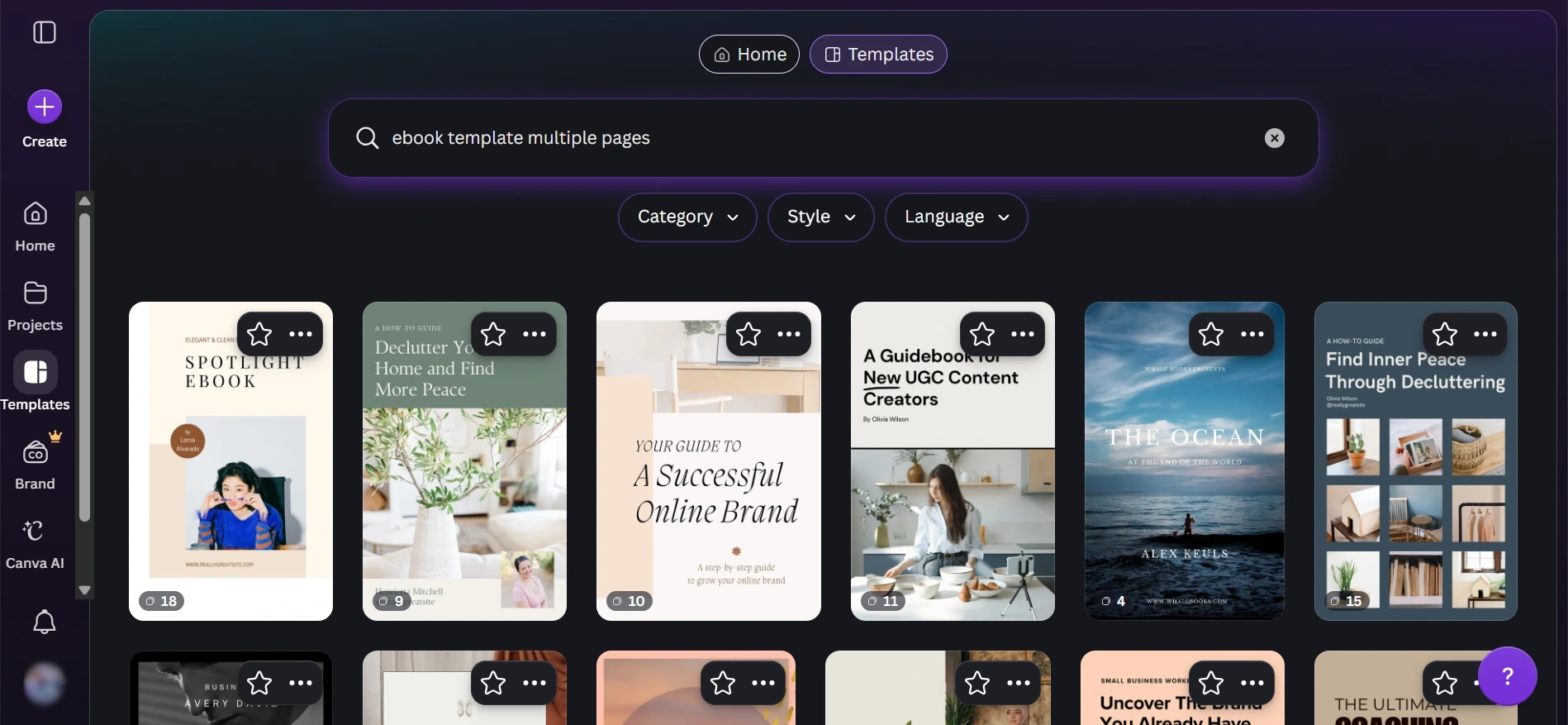
You do not need design skills for this. The template does the heavy lifting. Your job is to make the content clear and the design consistent.
Step three: Export as a PDF.
Canva exports your finished ebook as a high-quality PDF in two clicks. This is the file your buyer receives when they purchase.
Step four: Write a product description.
Your product description does more selling than your ebook itself, because buyers read it before they buy. A strong product description explains who the ebook is for, what specific problem it solves, what the buyer will be able to do after reading it, and what is covered inside.
Be specific. “This 24-page guide teaches freelancers how to price their services confidently, including a step-by-step formula for calculating your minimum hourly rate” converts better than “A helpful guide to freelancing.”
The whole process from blank document to finished PDF takes one to three weekends for a complete beginner. That is a realistic expectation, not a discouraging one.
How to Create Canva Templates to Sell
Canva templates are one of the fastest digital products to create, and they consistently perform well on platforms like Etsy and Payhip because buyers can see exactly what they’re getting before they purchase.
The process is simpler than most people expect.
Choose a specific type of template with a clear audience.
“Instagram templates” is too broad and too competitive. “Instagram story templates for hair salons” targets a specific business type with a specific platform need. “Weekly meal plan printable for families” targets a specific life situation. The more specific your template, the less competition and the more relevant the buyer who finds it.
Design in Canva using a blank canvas at the right dimensions.
For Instagram posts, the standard dimensions are 1080 by 1080 pixels. For Pinterest pins, 1000 by 1500 pixels. For A4 printables, set the canvas to A4 size. Use Canva’s design tools to create a clean, practical layout that your buyer can customise with their own colours, text, and images.
Make the templates editable by your buyer.
The value of a Canva template is that the buyer can open it in their own Canva account and change the text, colours, and fonts to match their brand. When you sell a Canva template, you share a special Canva template link rather than a static file. This link lets the buyer make a copy of your design in their own account.
Payhip, Gumroad, and Etsy both support delivering this type of link as a digital download. The buyer pays, receives the link, and opens their editable copy in Canva immediately.
Create a bundle rather than a single template.
A pack of ten Instagram templates sells better than a single template at a similar price point, because the perceived value is higher. Consider selling your first product as a small bundle of five to twelve related templates rather than one standalone design.
How to Create a Simple Online Course Without Expensive Equipment
Online courses earn more per sale than any other beginner-accessible digital product format, and the equipment required to make a good one is much simpler than most people assume.
Let me be direct about what you actually need.
You need a phone with a decent camera for any on-screen or face-to-camera lessons. Most phones made in the last three years record in high enough quality for a learning environment. A ring light costs $15 to $30 and makes an enormous difference to how professional the video looks. Natural light from a window works almost as well for free.
You need a screen recording tool for any lessons where you are teaching software, showing a process on your computer, or walking through a presentation. Loom is free for up to 25 videos and is specifically designed for this type of recording. OBS Studio is a free alternative with more options but a steeper learning curve.
You need a course hosting platform. Systeme.io hosts courses on its free plan with unlimited students, which means you can launch your first course and start earning before spending any money on the platform. Teachable is another strong option with a free plan that allows one course and handles all the payment and student management.
The course structure that works best for a first product is simple. Four to eight lessons, each ten to twenty minutes long, covering one specific skill from beginning to end. The course that teaches someone how to do one thing well earns more consistently than the course that tries to cover everything about a broad topic.
Where to Sell Your Digital Products as a Beginner
Choosing where to sell matters as much as what you’re selling, because the platform determines how your buyers find you, what the buying experience feels like, and what percentage of the sale you keep.
Here is my honest assessment of the main options.
Payhip is the platform I recommend most for a beginner’s first digital product. Their free plan charges no monthly fee and takes only a small percentage per transaction. You upload your file, create a product page with a description and cover image, set your price, and share the link wherever you want buyers to find it. The setup takes under an hour and the product is live and purchasable the same day. Payment goes to your PayPal or Stripe account.
Systeme.io handles digital products, courses, and funnels on its free plan, which makes it the better choice if you want to build a complete funnel around your product, including an email sequence that follows up with buyers and promotes additional products. If you are building more than one digital product or combining product income with affiliate marketing, Systeme.io’s free plan covers the infrastructure you need without a monthly cost.
Check out: Systeme.io Review 2026: Is It Worth It for Building an Online Business?
Etsy is worth knowing about specifically for printables and Canva templates, because Etsy has an existing marketplace of buyers actively searching for digital downloads. The platform takes a small percentage per sale and charges a small listing fee per product. The advantage is discoverability. Buyers come to Etsy looking for the type of products you are selling, which reduces the promotional work you need to do to find your first sales.
Teachable is the platform I’d use if your primary product is a structured online course. It handles video hosting, course organisation, student management, and payment processing in one place. The free plan allows one course, which is enough to validate the idea and earn your first course revenue before upgrading.
Gumroad is another solid option worth knowing about, especially if you already have an existing audience or plan to sell multiple product types. The platform supports ebooks, templates, courses, and even memberships. It has a free plan with a small percentage per transaction, and a premium monthly plan if you want to reduce fees as you scale. Gumroad’s interface is simple and creator-friendly, which makes it a good alternative to Payhip for beginners who want flexibility across different product formats.
My recommendation for most beginners: start with Payhip for simplicity and add Systeme.io when you want to build the funnel infrastructure around it. Gumroad is worth keeping in mind as a second option if you prefer its interface or plan to sell a wider variety of product types from the beginning.
Continue reading: Best Platforms to Sell Digital Products and Start Earning
How to Price Your Digital Product
Pricing is where most beginners either undersell themselves significantly or freeze entirely because they don’t know where to start.
Here is the honest framework I use.
Price by the value of the outcome, not by the effort you invested.
A 15-page guide that saves someone two weeks of trial and error is worth more than a 100-page ebook that covers everything but solves nothing specific. The effort you put in doesn’t determine the price. The value the buyer receives does.
Start with market research, not a number pulled from nowhere.
Search Etsy, Payhip, and Gumroad for products similar to yours. Look at what similar products are priced at and what the most successful ones include. Use that range as your starting point rather than pricing in a vacuum.
- For ebooks and PDF guides: $7 to $27 is the range that converts well for a first product with no existing audience or review history.
- For template packs: $5 to $20 for a small pack. $15 to $47 for a comprehensive bundle.
- For mini-courses: $27 to $97 depending on depth, length, and the specificity of the skill being taught.
- Raise the price once you have reviews.
Your first price is a starting price, not your permanent price. Once you have five to ten buyers who have left positive feedback or results, your credibility increases and your price can follow. Many digital product sellers double their price within the first three months as social proof accumulates.
Don’t underprice out of nervousness. A $5 ebook signals a $5 level of value before the buyer even opens it. Pricing at $17 or $27 signals that you believe the content is worth something, which makes buyers more confident before they purchase.
How to Get Your First Digital Product Sale
Creating the product is half the work. Getting the first sale is the other half, and it is where most beginners stall because they assume they need a large audience first.
You don’t. Here is what you actually need.
Share directly with your personal network first.
Message ten people in your contact list or social media following who match the description of your ideal buyer. Be direct and specific: “I just created a Canva template pack for small business owners who want professional-looking Instagram posts without hiring a designer. It’s $19, and I’d love your honest feedback. Here’s the link.” This approach gets your first sales and your first feedback, both of which are more valuable than any amount of platform optimisation.
Post in communities where your ideal buyer already spends time.
Facebook groups for your niche, Reddit communities related to your topic, and LinkedIn groups for your industry are all places where your buyer exists right now. Showing up consistently with genuine, helpful contributions and occasionally mentioning your product naturally produces sales over time.
Build an email list from day one.
Beehiiv gives you a free newsletter setup that collects email subscribers from the moment your account is created. Every person who subscribes to your list is someone you can reach directly when you launch your next product, update this one, or share genuinely useful content related to your niche. The email list is the compounding asset that makes each new product you create easier to sell than the last one. See How to Start Building an Email List From Zero
Use Pinterest if your product is visual.
Template packs, printables, and ebooks with a visual element perform well on Pinterest because the platform functions like a visual search engine with buying-intent traffic. A pin linking to your Payhip product page, created in Canva and scheduled through Tailwind, can bring in organic buyers continuously without active daily effort.
How Digital Products Fit Into a Bigger Online Income Strategy
Here is something I want you to think about carefully, because it changes how digital products feel as a long-term strategy rather than just a one-off project.
Digital products work best when they sit inside a broader content ecosystem rather than existing as isolated products with no surrounding support.
A beginner who creates an ebook about freelancing pricing and promotes it only by sharing the link occasionally earns sporadically. A beginner who writes a blog about freelancing, builds an email list through that blog, recommends relevant affiliate tools throughout the content, and sells the ebook as the deeper guide for readers who want more earns from all three income streams simultaneously, and each one makes the others stronger.
The blog brings readers. The email list retains them. The ebook converts them. The affiliate recommendations earn alongside all of it.
That is the structure behind The H.E.A.R.T Funnel Formula, which maps exactly how this kind of system comes together for beginners who want a clear, repeatable process for earning from content and recommendations without feeling like they’re constantly selling something.
The digital product is not the end of the income strategy. It is one of the most profitable layers within it.
See also: How to Earn Extra Income Online with Affiliate Marketing
Key Takeaways
- You already have the knowledge to create your first digital product. The gap is not what you know. It is converting what you know into a format someone else can purchase and use independently.
- Start simple and start fast. A finished ebook or template pack that launches this week is worth more than a comprehensive course that you work on for six months and never release.
- Free tools cover everything you need. Google Docs, Canva, Payhip, and Systeme.io give you creation, design, and selling capability at no cost. There is no minimum budget required to start.
- The first sale proves the model works. Price your product honestly, share it directly with your network, and get that first transaction done. Everything becomes clearer after it.
Conclusion
Creating digital products to sell is one of the most genuinely exciting income opportunities available to a beginner in 2026, and the reason I say that is specific.
It is one of the very few income models where the ceiling is completely uncapped by your time. You create something once and it can sell a hundred times, a thousand times, or more without you doing anything different for each additional sale.
The first product will not be perfect. Mine wasn’t. Most successful digital product creators look back at their first ebook or template pack and cringe a little at how basic it was. That doesn’t matter. What matters is that it existed, it solved a real problem for someone, and it generated the proof that the model works.
Your knowledge is worth something to someone. The question is not whether you have something to create. The question is whether you are willing to package it into a format they can buy this week.
Start with the simplest format you can finish. Use Canva and Google Docs. List it on Payhip. Share it with the ten people most likely to need it. Get the first sale.
Then build from there.
If you want a structured plan that walks you through your first week of building real online income, whether through digital products or any other method, The First Dollar Blueprint is exactly that. One task per day, seven days, and a clear path from nothing to something real.
Frequently Asked Questions
What is the easiest digital product for a beginner to create?
A PDF guide or ebook is the easiest starting point because it requires no design skills beyond basic formatting and no equipment beyond a computer or phone. You write the content in Google Docs, copy it into a free Canva ebook template, and export it as a PDF. The whole process takes one weekend for most beginners. Canva templates are the second easiest option and often sell faster than ebooks because buyers can see exactly what they are purchasing before they buy.
Do I need an existing audience to sell digital products?
No, but having an email list makes the first sale easier. You can start selling a digital product to your personal network before you have any formal audience. Sharing the link directly with ten people who match the description of your ideal buyer produces faster first sales than any amount of social media promotion to a cold audience. Once you have a few sales and reviews, listing on Etsy or promoting through Pinterest brings in organic buyers who don’t know you personally.
How much can a beginner realistically earn from digital products?
Income varies significantly based on the product type, the niche, and how actively you promote it. A beginner with one ebook listed on Payhip and a small personal network to share it with might earn $50 to $200 in the first month. A beginner with three products listed on Etsy in a strong niche and a consistent Pinterest strategy might earn $200 to $600 per month within three to six months of consistent effort. The income compounds as the product library grows, reviews accumulate, and organic discoverability increases over time.
Do I need any special skills to create digital products?
No formal qualifications or technical skills are required for most beginner digital products. Ebooks and PDF guides require the ability to write clearly on a topic you know. Canva templates require using Canva’s free drag-and-drop interface, which most people can learn in an afternoon. Simple online courses require speaking on camera or recording your screen, both of which are accessible with a modern smartphone. The most important skill is the knowledge you already have about a specific topic that someone else genuinely wants to learn.
Where is the best place to sell digital products as a beginner?
Payhip is the simplest starting point because the free plan has no monthly fee and lets you list and sell products within an hour of signing up. Systeme.io is better if you want to build a funnel and email automation around your products. Etsy works particularly well for printables and templates because buyers come to the platform specifically looking for digital downloads. Teachable is the best option if your product is a structured video course. Most experienced digital product sellers list on more than one platform to diversify discovery.
How long does it take to create and launch a first digital product?
A simple ebook or small template pack takes one to two weekends of focused work from start to live listing. A more comprehensive guide or template bundle takes two to four weeks. A mini-course with four to six video lessons takes two to six weeks depending on how much preparation the content requires and how comfortable you are on camera. The most common mistake is overscoping the first product. Constraining your first product to something you can genuinely finish in five to seven days is the most important decision you can make before you start creating.