How to Write Blog Posts That Rank on Google: A Step-by-Step Guide for Beginners

Writing great content is not enough if Google never shows it to anyone. Learn exactly how to write blog posts that rank on Google — from keyword research and structure to on-page SEO and the details most bloggers overlook.

A lot of beginner bloggers go through the same thing. They spend hours writing a post they feel good about, publish it, and expect at least some traffic to come in. But weeks pass, nothing happens, and they start wondering what they missed.
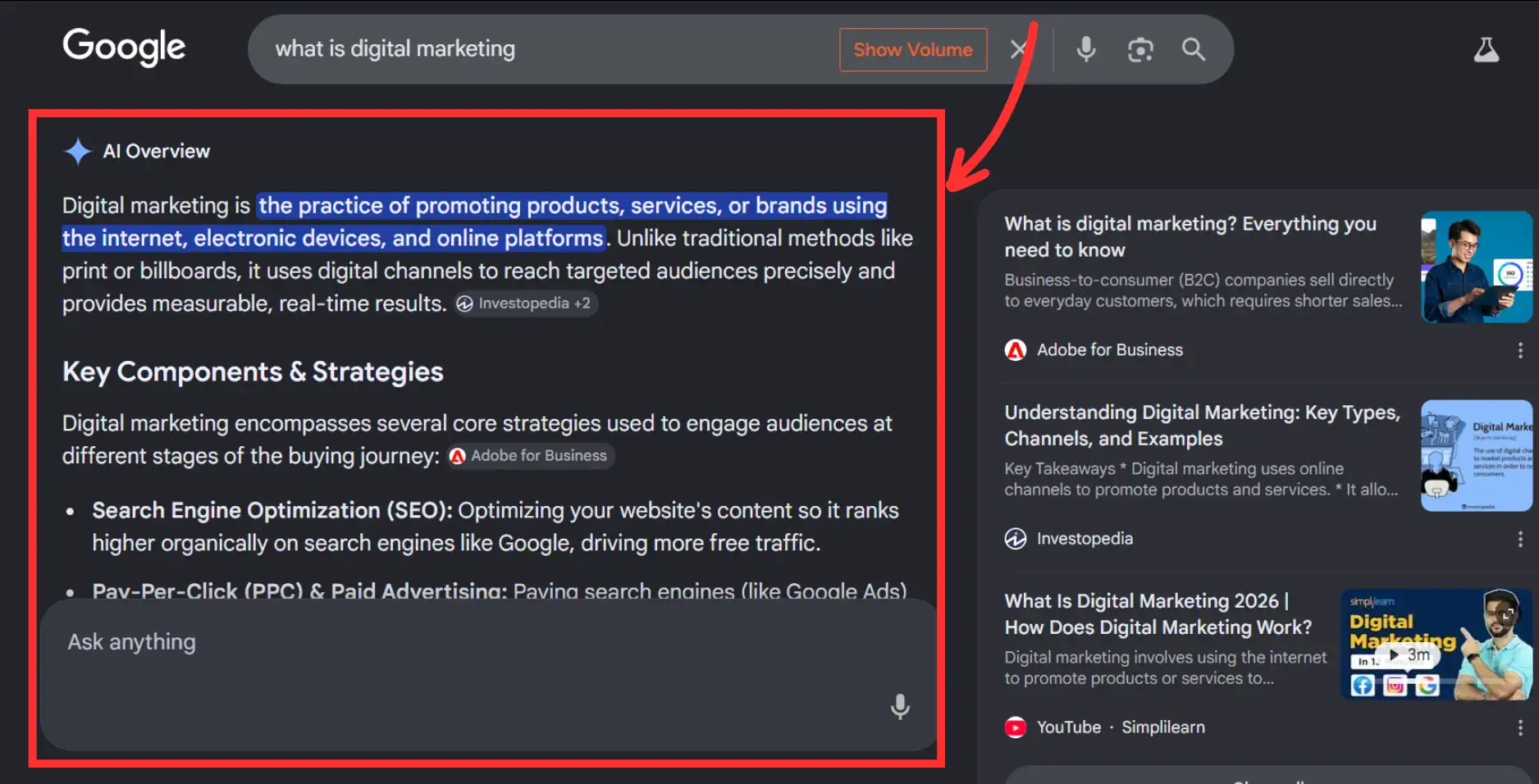
At the same time, search has become more competitive than it used to be. Google now shows AI Overviews for many searches, which means users can sometimes get answers directly on the results page without clicking through to a website. That has made weak, generic content even easier to ignore. Posts that lack depth, real experience, or clear structure struggle more than ever to gain visibility.
The answer is almost never that their writing is bad. The problem is usually in the steps that happen before and around the writing itself — things like keyword selection, search intent matching, post structure, and on-page optimization.
Knowing how to write blog posts that rank on Google is a learnable process. It is not about gaming an algorithm or stuffing keywords into every sentence. It is about understanding what Google is actually trying to do and creating content that genuinely earns its spot at the top, even in a search landscape shaped by AI-generated summaries.
This guide walks through the complete process from keyword research to post-publish strategy. Follow each step, and you will understand why some posts rank and others do not, and exactly what to do differently starting with your next post.
TL;DR
Writing blog posts that rank on Google starts with choosing the right keyword and understanding why someone is searching it. You then match your content structure and format to what Google is already ranking for that topic. On-page SEO elements like title tags, meta descriptions, headings, internal links, and image alt text all work together to signal relevance.
Posts that demonstrate real experience and cover a topic thoroughly tend to outperform generic content over time, especially now that AI Overviews favor content that answers questions clearly and shows genuine expertise. Ranking takes three to six months on average for new posts on new blogs.
Why Most Blog Posts Never Rank on Google
Before getting into the process, it helps to understand why so many blog posts never gain traction in search. The reasons are almost always the same.
The post targets a keyword that is far too competitive for the blog’s current authority level. A new blog trying to rank for “how to make money online” is competing against sites with millions of backlinks and years of content. That battle is unwinnable in the early stages.
The post does not match the search intent of the query. Google has a very clear sense of what format and angle best answer each search. When your post delivers a different format than what Google is already ranking for that query, it tends to get pushed down regardless of writing quality.
The post is too thin. It exists, but does not go deep enough to be the most useful result for someone searching that topic. Google’s job is to return the best answer. A shallow post rarely earns that position.
The post lacks on-page SEO basics. Missing title tag optimization, poor heading structure, no internal links, and no meta description all add up to a weaker signal even when the content itself is solid.
The blog is new and has not built enough authority yet. Google takes time to trust new websites. Posts on newer blogs take longer to rank, even when everything is done correctly. Patience is part of the process.
Most of these problems are fixable. And fixing them consistently across your content is what separates blogs that grow from blogs that stagnate.
Check out: How to Start a Blog and Make Money for Beginners: A Complete Step-by-Step Guide
Step 1: Start With Keyword Research, Not a Topic Idea
This is the single most important shift most beginner bloggers need to make.
The natural instinct is to think of a topic you want to write about and then write it. But that approach leaves your post’s success entirely up to chance. You might happen to cover something people are searching for. More often, you write something interesting that nobody is looking for at that specific moment.
Starting with keyword research flips that equation. You find out what your target audience is already typing into Google, choose a term you have a realistic chance of ranking for, and then write the post. Now the post has a target from day one.
What Makes a Keyword Worth Targeting
Three things determine whether a keyword is worth building a post around.
Search volume tells you how many people search for that term each month. Higher volume means more potential traffic, but also usually more competition. For new blogs, a keyword with 300 to 1,500 monthly searches in a focused niche is often a better target than one with 50,000 searches where established sites dominate.
Keyword difficulty tells you how competitive it is to rank for that term. Keyword research tools assign a difficulty score based on the authority of the pages currently ranking. As a beginner blog, you want to target keywords with lower difficulty scores where you have a realistic path to page one.
For example, I did keyword research on Semrush for the keyword “digital marketing” to check the search difficulty, and the screenshot below shows what the results look like.
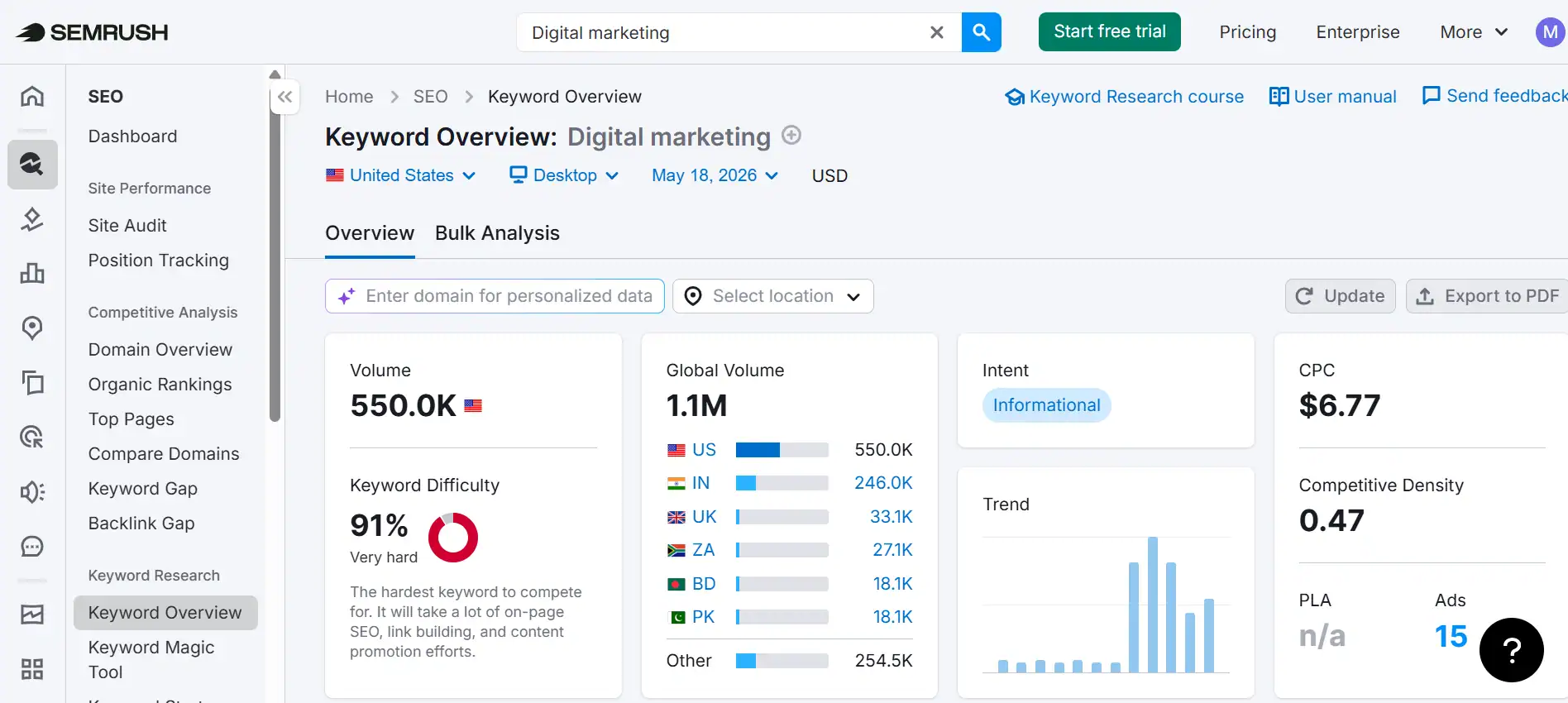
As you can see from the screenshot, the term “digital marketing” has a monthly search volume of 550,000 in the United States. That sounds exciting, but if you look at the Keyword Difficulty score. It is 91 percent, labeled “Very hard.” That means you are competing against major brands and websites with years of authority built up. Ranking for a keyword like this as a beginner is nearly impossible.
Search intent, which is covered in the next step, tells you what the searcher actually wants to find. A keyword that looks attractive based on volume and difficulty is only worth targeting if you can create the type of content Google is already ranking for it.
How to Find Keywords Beginners Can Actually Rank For
There are several practical approaches depending on your budget.
Google autocomplete is free and useful. Start typing your topic into Google and note the suggested completions. These are real searches, real people make. Each suggestion is a potential keyword.
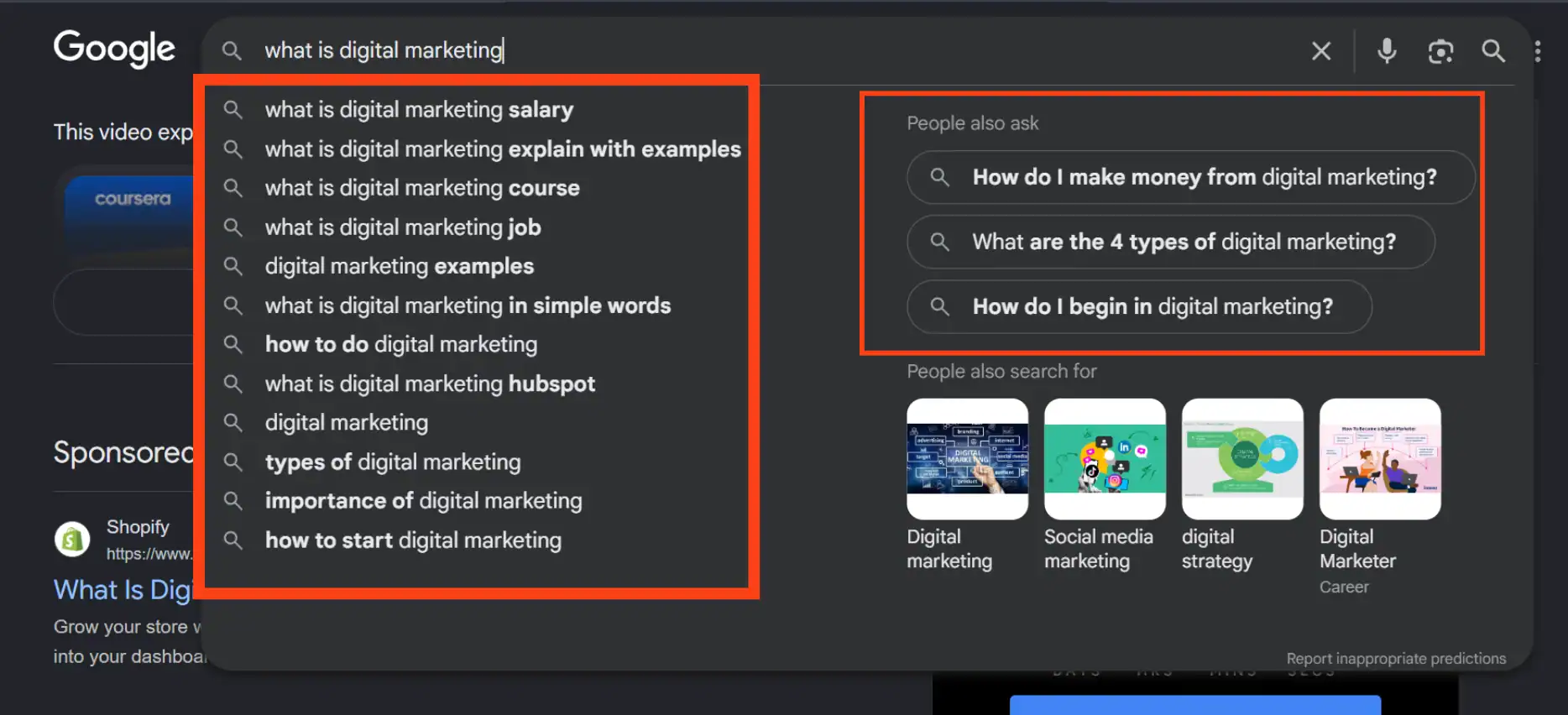
The “People Also Ask” box appears in most Google searches and shows related questions searchers are asking. Every question in that box is a potential blog post with a built-in audience.
If you want deeper data, Semrush shows you exact monthly search volumes, keyword difficulty scores, what your competitors are ranking for, and content gaps in your niche you have not covered yet. I use it to plan almost every piece of content I publish here. The free plan gives you enough daily searches to start making data-informed decisions, and the paid plan unlocks the kind of depth that makes content planning significantly faster.
Look for keywords with what I think of as a gap between interest and competition. Meaningful search volume, lower competition than average for your niche, and a search intent you can genuinely serve well.
Understanding Keyword Intent Before You Write
Every keyword has an intent behind it. The person who types “best email marketing tools” is researching options before buying. The person who types “what is email marketing” is learning for the first time. The person who types “GetResponse vs Mailchimp” has nearly made a decision and wants confirmation.
Before targeting any keyword, ask yourself what the person who types it actually wants to find. Your post needs to serve what they want directly. If it does not, Google will not rank it regardless of how well-written it is.
Step 2: Understand What Google Actually Wants to Rank
This step trips up more bloggers than almost anything else. You can find a great keyword, write a thorough post, and still not rank because you delivered the wrong format for that search.
Google has already done the work of figuring out what format best answers each query. The results on page one tell you exactly what that format is.
The Four Types of Search Intent
Every search fits roughly into one of four categories.
Informational searches are people looking to learn something. “How to write blog posts that rank on Google” is informational. The person wants a guide, a tutorial, or an explanation. Long-form how-to content typically performs well here.
Navigational searches are people looking for a specific website or brand. “Semrush login” is navigational. You cannot really rank for these unless you are the brand being searched.
Commercial investigation searches are people researching before a purchase decision. “Best SEO tools for bloggers” is commercial. These searchers want comparisons, lists, and honest assessments. Top-10 style posts and comparison content perform well here.
Transactional searches are people ready to buy or act. “Buy Semrush plan” is transactional. These searches usually favor product pages and landing pages over blog content.
For bloggers building organic traffic, informational and commercial investigation content are where most of the opportunity lives.
How to Analyze the Search Results Before You Write
Before writing any post, Google the keyword you are targeting and study the first five results. Look for patterns.
What format are they using? Are they listicles, long-form guides, short tutorials, or video-embedded posts? The dominant format on page one tells you what Google considers the best answer structure for that query.
How long are the posts that rank? Are they 800 words or 3,000? Length is not the deciding factor in rankings, but consistently ranking content in your niche gives you a useful reference point.
What headings do they use? The H2 and H3 headings of ranking posts tell you which subtopics Google considers most relevant to the query. Use these as input when building your own outline.
What angle do they take? Are they written for complete beginners or more experienced readers? Does Google seem to favor a specific perspective for this topic?
This analysis takes ten to fifteen minutes and dramatically improves the chances that your post matches what Google is looking for.
Why Matching Intent Beats Everything Else
A technically perfect post that mismatches the search intent will almost always underperform a simpler post that perfectly delivers what the searcher needed.
I have seen this play out repeatedly on this site and in the blogs I have studied closely. Matching intent is not a trick or a hack. It is the core logic of Google’s ranking system. The search engine is trying to return the most useful result for each query. When your post genuinely is the most useful result for that specific intent, ranking follows over time.
Step 3: Plan Your Post Structure Before You Write a Single Word
Most bloggers open a blank document and start writing from the top. This almost always produces posts that wander, miss important subtopics, repeat points unnecessarily, or run long in some areas and thin in others.
Planning your structure before writing changes the quality of everything that follows.
How to Build an SEO-Friendly Post Outline
Start with your primary keyword and the search intent behind it. Then build your outline around answering that intent completely.
Use the “People Also Ask” box in Google for the keyword you are targeting. The questions there are exactly what Google knows people want answered when they search that term. Each relevant question deserves its own section.
Look at the headings competing posts use and identify which subtopics appear consistently. If three of the top five results have a section on X, Google clearly considers X relevant to the query. Include it.
Add your own angle and experience to make your outline distinctive. You are not copying the structure blindly. You are using the evidence of what ranks to inform a better, more complete version.
Using Headings the Right Way
Headings do two things. They help readers navigate your content quickly, and they signal to Google what each section covers and how it relates to your primary topic.
Use one H1 per post. That is your post title. It should include your primary keyword as naturally as possible.
Use H2 headings for your main sections. Each H2 should cover a distinct part of the topic. Including your primary keyword or closely related terms in two to three H2s is good practice, but do not force it. Clarity and relevance matter more than keyword density in headings.
Use H3 headings for subsections within each main section. They break longer sections into digestible parts and help both readers and Google understand the depth of your coverage.
Avoid skipping heading levels. Going from H2 directly to H4 creates a confusing hierarchy that affects how both readers and search engines parse your content.
How to Decide What to Include and What to Leave Out
A common mistake in SEO content is including everything that could possibly be relevant to a topic, which produces posts that are long but not particularly focused.
Every section in your post should directly serve the reader who searched your target keyword. If a section is interesting but not actually relevant to what that specific searcher needs, leave it out or link to a separate post that covers it.
Depth beats length. A 1,800-word post that covers every relevant aspect of a topic clearly and specifically will outperform a 3,500-word post padded with tangentially related information.
Step 4: Write the Post With Both the Reader and Google in Mind
With your keyword research done and your outline built, the writing itself becomes significantly easier. You know exactly what to cover and in what order. The main challenge now is doing it in a way that keeps readers engaged and signals quality to Google.
How to Open a Blog Post That Keeps Readers On-Page
Google tracks user behavior signals. If someone clicks your post from the search results and leaves within a few seconds, that is a signal that your content did not deliver what they needed. Enough of those signals, and Google pushes your ranking down.
Your opening needs to do one thing immediately — confirm to the reader that they are in the right place. Tell them what the post covers, why it matters to them, and what they will be able to do after reading. Do this in the first two to three short paragraphs. Get to the value fast.
Avoid long introductions that build slowly to the point. Avoid starting with “In today’s world…” or any other vague warmup. Most readers have already decided whether to stay or leave within the first thirty seconds.
Using Keywords Naturally Without Over-Optimizing
Your primary keyword needs to appear in several specific places. These are non-negotiable for on-page SEO.
In your H1 title tag. In the first paragraph of your post, ideally in the first fifty words. In at least two H2 headings. In the meta description. And a handful of times naturally throughout the body.
Beyond that, use related terms and semantic variations rather than repeating the exact primary keyword. If your primary keyword is “how to write blog posts that rank on Google,” related terms might include “ranking blog content,” “SEO writing,” “writing for search intent,” and “on-page optimization.” Using these variations signals comprehensive topic coverage rather than keyword stuffing.
The test for whether you have over-optimized is simple. Read your post aloud. If a phrase sounds forced or repetitive in conversation, it needs to be rewritten.
Writing for Readability — What Google Measures and Why
Google uses engagement signals to evaluate content quality. Time on page, pages viewed per session, and bounce rate all factor in to some degree. Readable content that holds attention naturally performs better on these signals.
Short paragraphs. Two to three sentences maximum. Long blocks of text cause readers to skim past whole sections, which drops the time they spend on your page.
Short sentences where possible. Aim for under twenty words per sentence most of the time. Vary the rhythm occasionally to avoid sounding mechanical, but default to brevity.
Plain language. If a simpler word communicates the same idea, use it. Complicated vocabulary does not signal expertise to readers or to Google. A clear explanation does.
Bullet points and numbered lists where the content naturally fits that format. Not everywhere. But when you are listing multiple items or steps, a list is easier to scan and process than a dense paragraph.
Step 5: Optimize Your On-Page SEO Elements
Even the best-written post needs its on-page SEO elements properly configured. These are the signals Google reads alongside your content to understand what your post is about and whether it is the right result for a given search.
Title Tags and Meta Descriptions
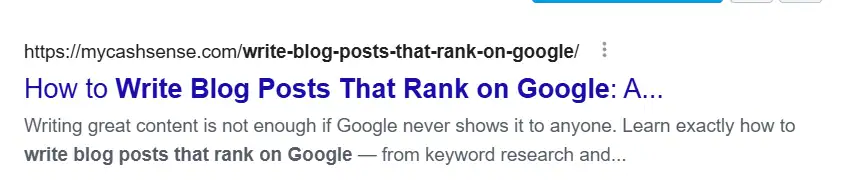
Your title tag is what appears as the clickable headline in Google search results. It should include your primary keyword, preferably near the beginning, and be compelling enough that people choose your result over the others on the page. Keep it under 60 characters so it does not get cut off in search results.
Your meta description is the short snippet of text that appears below the title in search results. It does not directly affect your ranking position, but it affects your click-through rate significantly. A well-written meta description that clearly explains what the reader will get from your post brings in more clicks than a generic or auto-generated one. Keep it between 150 and 160 characters and include your primary keyword naturally.
URL Slugs and Heading Tags
Your URL slug is the part of the web address that identifies your specific post. Keep it short, clean, and keyword-focused. Remove unnecessary words like “a,” “the,” “and,” and “how.” A URL like /write-blog-posts-rank-google is better than /how-to-write-blog-posts-that-rank-on-google-for-beginners.
Confirm your H1 heading contains your primary keyword. Check that H2s cover the main subtopics clearly. Run through the heading hierarchy to make sure it flows logically from broad to specific.
Images, Alt Text, and Page Speed
Every image you use in a post should have descriptive alt text. Alt text is the written description of an image that screen readers use and that Google indexes to understand the image content. It should describe the image accurately and, where relevant, include a related keyword naturally.
If writing alt text for every image starts feeling repetitive, tools like Tailwind can help generate image descriptions faster while still giving you room to edit and make them sound natural. This saves time, especially when working on longer blog posts with multiple images.
Compress every image before uploading because large image files can slow your page down significantly, and since page speed is a confirmed Google ranking factor, I use ShortPixel to compress images automatically during my blog writing process.
For more information, here is a deeper breakdown of on-page SEO factors that affect rankings.
Internal Linking — The Element Most Bloggers Ignore
Internal linking is one of the most underused on-page SEO techniques for beginner bloggers.
When you link from one post on your site to another related post, you pass authority between pages and help Google understand the topical structure of your site. It also keeps readers on your site longer, which improves engagement signals.
Every post you publish should include two to four internal links to other relevant posts on your blog, using descriptive anchor text that tells both the reader and Google what the linked post covers. Do not use “click here” as anchor text. Use something like “how to build an email list for your blog” instead.
Step 6: Write Content That Demonstrates Real Experience and Expertise
Google’s E-E-A-T guidelines, which stand for experience, expertise, authoritativeness, and trustworthiness, have become increasingly important in how content is evaluated. This is not just a technical checklist. It is a reflection of what Google has always been trying to reward — content written by people who genuinely know what they are talking about.
Generic content that aggregates publicly available information without adding original insight is consistently losing ground to content that demonstrates real knowledge through specificity and lived experience.
What does that look like in practice?
Specific examples over vague claims. “Use an SEO tool to find keywords” is generic. “I used Semrush’s keyword magic tool to find a 400-search-per-month phrase with a difficulty score of 28 that now brings in consistent traffic” is specific and credible.
Honest assessments over universal praise. If a tool has a limitation worth knowing about, saying so builds trust rather than eroding it. Readers can tell when a review is balanced versus when someone is just trying to get a click.
Personal context where relevant. Not every post needs a personal anecdote, but where your own experience adds useful context, including it strengthens both your relationship with the reader and the perceived authority of the content.
Accurate, current information. Outdated advice covered confidently signals to both readers and Google that the content has not been maintained. Check your facts, update posts when circumstances change, and reference current best practices.
Step 7: Build the Post for Featured Snippets
A featured snippet is the highlighted answer block that appears at the very top of some Google search results, above the regular organic listings. Earning a featured snippet means your content is shown in position zero — above every other result on the page.
As we all know, search has changed a lot recently. Yes, featured snippets still exist, but Google’s AI Overviews now dominate many search results and often answer questions before users reach the normal listings. That is why content today needs to be clearer, more structured, and quicker to answer the main question. Optimizing for featured snippets still matters because Google often pulls those same well-structured answers into AI Overviews.
You do not need a massive authority site to earn featured snippets. Google pulls them based on how well a specific piece of content answers a specific question, not based on overall domain authority.
The most common featured snippet formats are paragraph answers, numbered lists, and bulleted lists. Here is how to structure content for each.
For paragraph snippets, which appear for “what is” and “how does” queries, write a clear, concise answer of around forty to sixty words immediately below the relevant heading. Do not bury the answer in the middle of a long section.
For list snippets, which appear for “how to” and “best of” queries, use a numbered or bulleted list with clear, short items. Google often pulls these lists directly.
For table snippets, present comparison data in a clean table format. These appear for comparison-style queries.
The practical approach is to look at whether a featured snippet already exists for your target keyword and what format it takes. Then structure your answer to that format better than the current snippet does.
What to Do After You Publish
Most bloggers publish a post and move on to the next one immediately. That leaves easy gains on the table.
The first thing to do after publishing is to request indexing through Google Search Console. Go to the URL inspection tool, enter your post URL, and click “Request Indexing.” This tells Google to crawl your post sooner rather than waiting for it to be discovered naturally.
Share the post through whatever channels you have. Your email list, social media, relevant online communities where self-promotion is acceptable. Even small early traffic signals tell Google the post is generating interest.
Build at least two or three internal links from other existing posts on your site to the new post. This is something most bloggers forget, but it matters. New posts with no internal links pointing to them are harder for Google to discover and slower to build authority.
After about three months, go back to the post and check its performance in Google Search Console. Look at what keywords it is appearing for, what position it is ranking in, and what the click-through rate looks like. Use that data to improve the post.
If the post is ranking on page two for a keyword, a round of updates expanding coverage, adding internal links, improving the title tag, or refreshing the content can often move it to page one. Updating existing content is one of the highest-return activities in blogging and most beginners overlook it entirely.
How Long Does It Take for a Blog Post to Rank on Google?
This is one of the most common questions beginner bloggers ask. The honest answer is that most posts on new or relatively new blogs take between three and six months to start appearing meaningfully in search results.
That does not mean nothing happens before then. Google discovers and indexes most posts within days to weeks of publishing. But climbing from a low position to somewhere on page one takes time because Google is evaluating the post against competing content over a sustained period.
Several factors affect ranking speed. The competitiveness of the keyword you are targeting. The overall authority of your domain. How many quality internal and external links point to the post. How well the content matches the search intent. And how thoroughly the post covers the topic compared to what is currently ranking.
What you can do to influence the speed is publish consistently so your site builds authority steadily. Focus on lower-competition keywords in the early months. Build your internal link structure carefully. And update posts that are ranking on page two or three rather than waiting passively.
The compounding nature of blog content means that posts published today are often your strongest traffic drivers a year from now. That delayed payoff is real, and it is worth building through.
The On-Page SEO Checklist — Before You Hit Publish
Use this every time before publishing a post.
Keyword and Intent
- Primary keyword identified and validated with search volume data
- Search intent confirmed by analyzing current page one results
- Keyword appears in first fifty words of the post
- Keyword appears in H1 title tag
- Keyword appears in at least two H2 headings naturally
- Keyword appears in meta description
- Related and semantic terms used naturally throughout
Structure and Readability
- Post outline built before writing began
- Heading hierarchy is logical — H1, H2, H3 used correctly
- Paragraphs are two to three sentences maximum
- No large walls of text
- Bullet points or numbered lists used where the content fits that format
- Post opens with a strong, direct introduction
On-Page SEO Elements
- Title tag includes primary keyword and is under 60 characters
- Meta description is between 150 and 160 characters with keyword included
- URL slug is short, clean, and keyword-focused
- All images have descriptive alt text
- Images are compressed for fast loading
- Two to four internal links to related posts on the site
- External links to authoritative sources where relevant
Quality and Trust
- Post demonstrates real experience or specific knowledge on the topic
- Claims are accurate and current
- No keyword stuffing or forced repetition
- Content is more thorough than the majority of current page one results
- Affiliate disclosure included if affiliate links are present
- Indexing requested in Google Search Console after publishing
Check out: How to Start Affiliate Marketing for Beginners: A Complete Step-by-Step Guide
Conclusion
Writing blog posts that rank on Google is not about outsmarting an algorithm. It is about understanding what Google is actually trying to do — return the most genuinely useful answer to each search — and then building content that earns that position.
Start with a keyword people are actually searching for. Understand what they want to find when they search it. Structure your post to deliver that thoroughly. Optimize the on-page elements that signal relevance to Google. Write from real experience and specific knowledge. And then be patient while the compounding effect of good content builds over time.
The bloggers who rank consistently are not the ones with the biggest budgets or the most followers. They are the ones who do this process correctly on post after post until it becomes second nature.
Your next post is where this starts. Use the checklist. Follow the steps. Give it time to work.
To go deeper on related topics, read through how to start a blog and make money for beginners or explore the best ways to drive traffic to a new blog. Both connect directly to what you have learned here.
Frequently Asked Questions About How to Write Blog Posts That Rank on Google
How long should a blog post be to rank on Google?
There is no single correct length. The right length is whatever it takes to fully answer the search intent behind your target keyword without padding. Informational and pillar posts often perform well between 1,500 and 3,500 words. Simpler how-to posts can rank strongly at 800 to 1,200 words if they cover the topic completely. Study what is already ranking for your keyword to calibrate the right range.
How many times should I use my keyword in a blog post?
Use your primary keyword naturally in the title, the first paragraph, two to three H2 headings, the meta description, and a few times throughout the body. Beyond that, shift to related terms and semantic variations. There is no magic number. If the keyword appears forced or repetitive when you read the post aloud, you have likely over-used it. Clarity always wins over keyword density.
Why is my blog post not showing up on Google?
Several things could be causing this. The post may not have been indexed yet — check Google Search Console and request indexing. The keyword may be too competitive for your current domain authority. The post may not match the search intent of the keyword you are targeting. The content may be too thin compared to what is currently ranking. Or the post simply needs more time — new blog posts can take three to six months to rank meaningfully.
Do I need backlinks to rank a blog post on Google?
Backlinks help significantly, particularly for competitive keywords. But you can rank for lower-competition keywords with little to no backlinks if your content is well-structured, matches search intent, and demonstrates expertise. Focus on earning backlinks over time through quality content and relationships with other bloggers in your niche rather than chasing them aggressively as a beginner.
What is the most important SEO element in a blog post?
Search intent matching is arguably the most important single factor. A post that perfectly matches what searchers want to find when they use a specific query will outperform a technically superior post that misses the intent. After intent, on-page elements like the title tag, heading structure, and internal linking are the next highest-leverage factors for most beginner bloggers.
Should I update old blog posts or keep writing new ones?
Both matter, but updating existing posts is one of the highest-return activities available to bloggers with content already published. A post ranking on page two for a relevant keyword can often move to page one with targeted improvements — expanding thin sections, refreshing outdated information, improving the title tag, and adding internal links. Check Google Search Console regularly to find posts already gaining traction that could rank higher with updates.